Smart File Agent
- A tiny, educational demonstration of an agentic AI pipeline — no LLMs, no APIs, just pure Python.




🧠 Overview
Smart File Agent is a tiny, self‑contained demonstration of an agentic AI pipeline — built entirely in Python
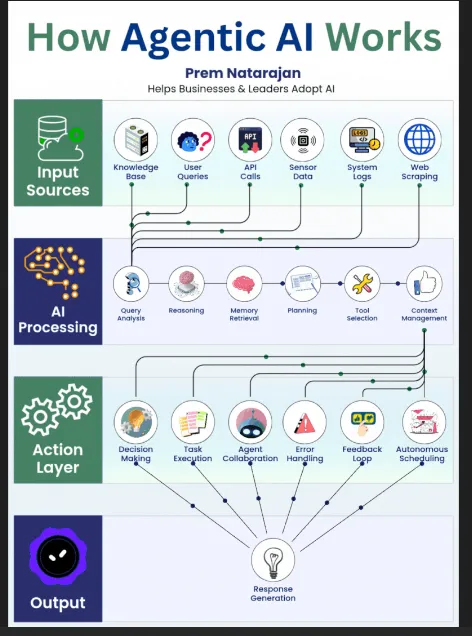
It mirrors the architecture shown in the “How Agentic AI Works” diagram:
Input Sources → file ingestion
AI Processing → request analysis + planning
Action Layer → tool execution (summarise, bulletify)
Output → clean Markdown summary
This project is intentionally small and easy to understand.
📸 Screenshots
- Smart File Agent is a miniature implementation of the agentic‑AI pipeline shown below — it ingests a file, analyses the user’s request, plans the steps, executes tools, and produces a structured output exactly like the Input → Processing → Action → Output flow in the diagram.
🏗️ Project Structure
smart_file_agent/
│
├── smart_file_agent/
│   ├── __init__.py
│   ├── main.py
│   ├── agent/
│   │   ├── __init__.py
│   │   ├── agent_core.py
|   |   ├── logging_config.py
│   │   ├── ingestion.py
│   │   ├── processing.py
│   │   ├── tools.py
│   │   └── output.py
│
├── venv/
├── README.md
└── project_notes.txt
🧩 How It Works (Mapped to Agentic AI Architecture)
Input Sources → ingestion.py
- Loads the file text
- Extracts metadata (name, size, extension)
AI Processing → processing.py
- Analyses the user’s request
- Chooses a mode (summary or bullet summary)
- Plans the steps the agent should take
Action Layer → tools.py
- Implements two tiny rule‑based tools:
- summarise_text() → extracts first sentence, longest sentence, keywords
- bulletify() → converts sentences into bullet points
Agent Orchestration → agent_core.py
- Runs the pipeline and executes each planned step in order
- Produces a structured result dictionary
Output Layer → output.py
- Formats the final Markdown summary
▶️ Running the Agent
From the project root:
python -m smart_file_agent.main
You’ll be prompted for: - File path - What you want the agent to do
Example:
Enter file path: (File path of any text document you have) What would you like to do? bulletify
💬 Supported Prompts
You can speak to the agent naturally. Here are some example prompts:
Summaries
- summarise this
- give me a summary
- summarise the file
- what is this file about
Bullet summaries
- bulletify
- give me bullet points
- turn this into bullets
- bullet summary please
The agent detects the intent and chooses the correct mode.
🧪 Example Output
- AGENT OUTPUT
Summary of project_notes.txt
Mode: bulletsummary Steps: extracttext, summarise, bulletify
- Summary:
- Opening idea: ...
- Key detail: ...
- Keywords: ...
🎯 Why This Project Exists
This project demonstrates:
how agentic systems work internally
how to build a reasoning → planning → action pipeline
how to structure a Python agent project
how to simulate LLM behaviour without external dependencies
It’s intentionally tiny, readable, and educational.
🛣️ Roadmap Features
[ ] Add a reasoning trace (“Thought → Action → Result”)
[ ] Add a memory system
[ ] A reasoning trace (LLM‑style)
[ ] Add a tool registry
[ ] Add a local LLM mode (Ollama)
[ ] Add a FastAPI interface
📝 Notes
- It was enjoyable to build this. If you have any ideas on how to collaborate and improve this project please let me know.
- Built by Roy Peters 😁
